---
title: Padlocks
description: Padlocks on search results and article pages and their meaning
---
[Skip to content](https://support.informit.org/knowledge-base/the-meaning-of-different-access-levels-and-padlocks-on-search-results#main-content)
English
Show submenu for translations
[Contact us for more support?](https://support.informit.org/knowledge-base/kb-tickets/new?hsLang=en)
[](https://support.informit.org/migration/knowledge-base?hsLang=en)
- [Go to search.informit.org](https://search.informit.org/)
Open main navigation
Close main navigation
- [Go to search.informit.org](https://search.informit.org/)
- English
Show submenu for translations
- [Contact us for more support?](https://support.informit.org/knowledge-base/kb-tickets/new)
- [Go to search.informit.org](https://search.informit.org/)
[Go to search.informit.org](https://search.informit.org/)
How can we help you today?
- There are no suggestions because the search field is empty.
1. [Informit Knowledge Base](https://support.informit.org/knowledge-base?hsLang=en)
2. [Informit](https://support.informit.org/knowledge-base/informit?hsLang=en)
3. [Platform Search Strategies](https://support.informit.org/knowledge-base/informit?hsLang=en#platform-search-strategies)
October 7, 2026
# Padlocks
## Padlocks are used across the Informit platform to help you understand what content you can access.
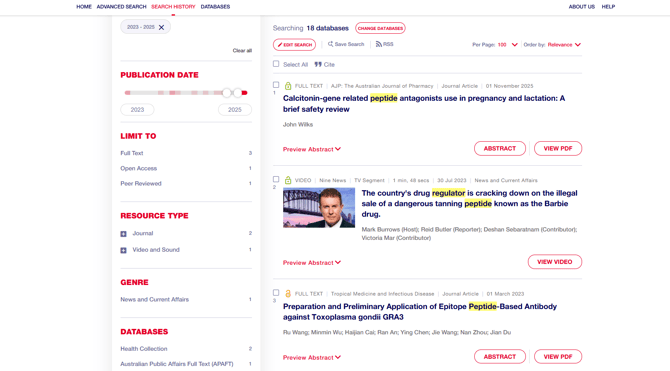
There are a number of different **padlocks** across the Informit platform that indicate your access.
These padlocks can be found on the **search results** as well as on the **Table of contents** and **article** pages.
In addition to padlocks, there are also **labels** on the records that indicate whether the record provides **full text**, **video** or **abstract only** access.
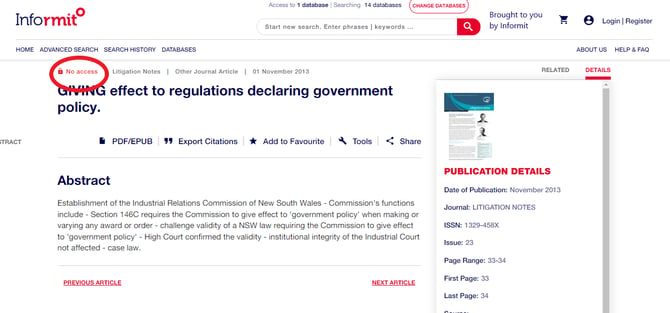
**Article page:**
---
Padlocks stand for different **levels** of access:
| **** | **Green padlocks** indicate that you have access to the full text or index record. |
| --- | --- |
|  | **Yellow padlocks** indicate that the content is open access. |
|  | **Red padlocks** indicate that you do not have access to a record. |
---
Labels stand for different **types** of access:
**FULL TEXT** - record is associated with Informit hosted content (in PDF, HTML Format) or has links to full text via external links to full text (eg. DOI links etc.)
**VIDEO** - record is associated with Informit streaming video content
**ABSTRACT ONLY** - record provides metadata and may have external links for content
---
**Accessing content with a red padlock**
**Option 1: Accessing Informit through an institution**
- If you are accessing Informit via your institution’s subscription, check that the name of the institution appears in the banner at the top of the screen.
- If it doesn’t appear, there is an authentication issue and you will need to contact us at [support.informit@rmit.edu.au](mailto:support.informit@rmit.edu.au)
- If your institution’s logo appears in the banner, a red padlock means that your institution has not subscribed to the publication.

**Option 2: Purchasing an Article**
If you are accessing Informit as an individual and the article is available for purchase:
Select the **PDF** link.
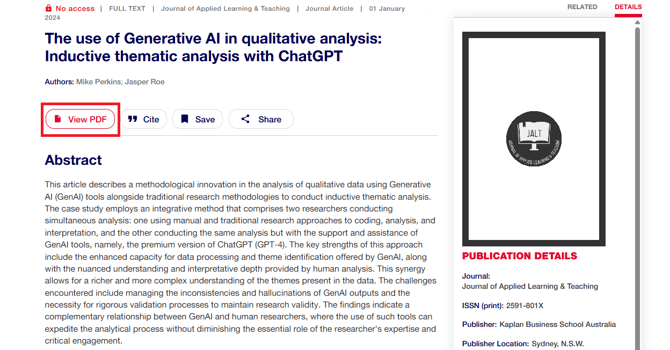
Enter your payments details to purchase the article.
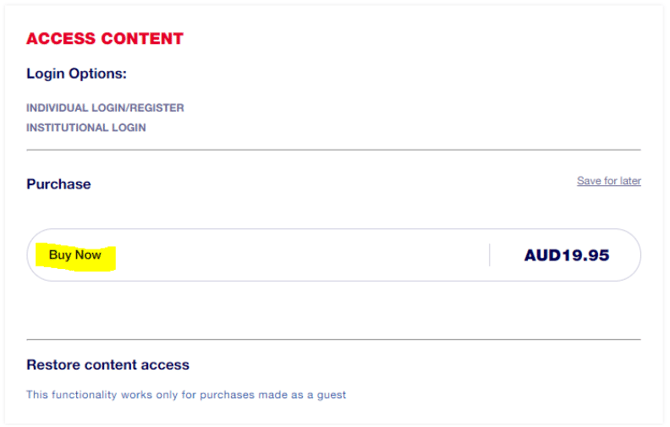
If you are not taken to the payment screen after clicking on the PDF link, the article is not available for individual purchase.
**Still Need Help?**
Reach out to our [Customer Success team.](mailto:support.informit@rmit.edu.au)
- [Informit](https://support.informit.org/knowledge-base/informit?hsLang=en#main-content)
- [Authentication](https://support.informit.org/knowledge-base/informit?hsLang=en#authentication)
- [Content Updates and Announcements](https://support.informit.org/knowledge-base/informit?hsLang=en#content-updates-and-announcements)
- [Platform Search Strategies](https://support.informit.org/knowledge-base/informit?hsLang=en#platform-search-strategies)
- [Core Training and Education resources](https://support.informit.org/knowledge-base/informit?hsLang=en#core-training-and-education-resources)
- [Core Administrator tools](https://support.informit.org/knowledge-base/informit?hsLang=en#core-administrator-tools)
- [Informit Explore](https://support.informit.org/knowledge-base/informit-explore?hsLang=en#main-content)
- [Explore Authentication](https://support.informit.org/knowledge-base/informit-explore?hsLang=en#explore-authentication)
- [Explore Content Updates and Announcements](https://support.informit.org/knowledge-base/informit-explore?hsLang=en#explore-content-updates-and-announcements)
- [Explore Search and Navigation](https://support.informit.org/knowledge-base/informit-explore?hsLang=en#explore-search-and-navigation)
- [Explore Training and Education resources](https://support.informit.org/knowledge-base/informit-explore?hsLang=en#explore-training-and-education-resources)
- [Explore Administrator tools](https://support.informit.org/knowledge-base/informit-explore?hsLang=en#explore-administrator-tools)
- [Publishing & Partners](https://support.informit.org/knowledge-base/publishing-partners?hsLang=en#main-content)
- [Partner Dashboard](https://support.informit.org/knowledge-base/publishing-partners?hsLang=en#partner-dashboard)
- [Publisher Resources](https://support.informit.org/knowledge-base/publishing-partners?hsLang=en#publisher-resources)
[](https://search.informit.org/)
[Start your search with Informit.org](https://search.informit.org/)
[About Informit](https://about.informit.org/)
Copyright © 2025, Informit
Melbourne, Australia