---
title: Getting started with Explore Media
description: Explore Media is a new video-streaming add-on that supplements your existing Explore subscription by providing access to videos and interactive screen guides that can be used in the classroom and integrated into your school’s Learning Management System (LMS). Feature and short films and television programs on a wide range of subjects and across all genres are available to Explore Media subscribers along with news and current affairs segments from national and international broadcasters.
---
[Skip to content](https://support.informit.org/knowledge-base/getting-started-with-explore-media#main-content)
English
Show submenu for translations
[Contact us for more support?](https://support.informit.org/knowledge-base/kb-tickets/new?hsLang=en)
[](https://support.informit.org/migration/knowledge-base?hsLang=en)
- [Go to search.informit.org](https://search.informit.org/)
Open main navigation
Close main navigation
- [Go to search.informit.org](https://search.informit.org/)
- English
Show submenu for translations
- [Contact us for more support?](https://support.informit.org/knowledge-base/kb-tickets/new)
- [Go to search.informit.org](https://search.informit.org/)
[Go to search.informit.org](https://search.informit.org/)
How can we help you today?
- There are no suggestions because the search field is empty.
1. [Informit Knowledge Base](https://support.informit.org/knowledge-base?hsLang=en)
2. [Informit Explore](https://support.informit.org/knowledge-base/informit-explore?hsLang=en)
3. [Explore Search and Navigation](https://support.informit.org/knowledge-base/informit-explore?hsLang=en#explore-search-and-navigation)
April 21, 2026
# Getting started with Explore Media
#### **What is Explore Media?**
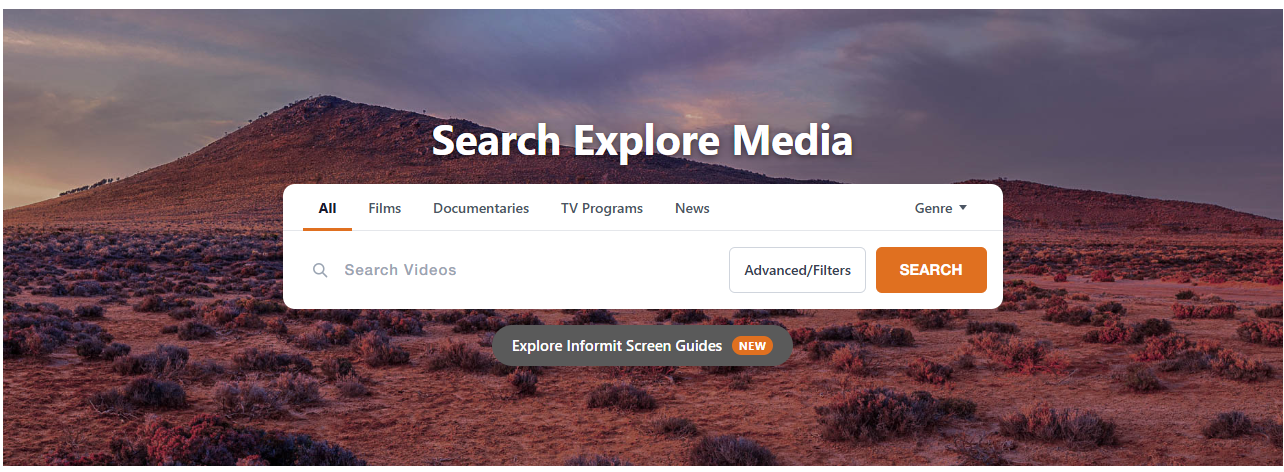
#### Explore Media is a video-streaming add-on that supplements your existing Explore subscription by providing access to videos and interactive screen guides that can be used in the classroom and integrated into your school’s Learning Management System (LMS).
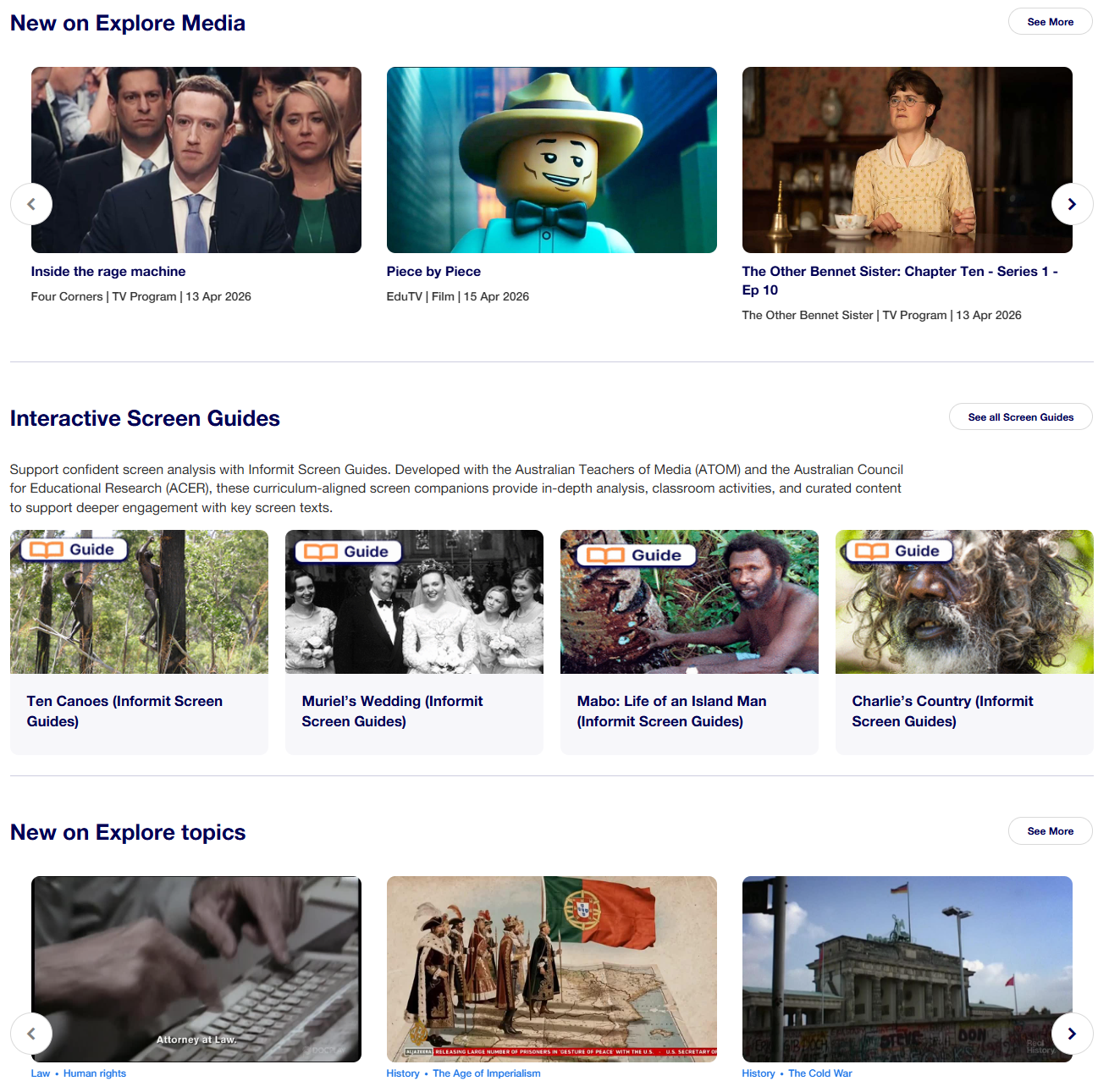
Feature and short films and television programs on a wide range of subjects and across all genres are available to Explore Media subscribers along with news and current affairs segments from national and international broadcasters.
Interactive screen guides have been created in partnership with media and educational professionals from Australian Teachers of Media (ATOM) and the Australian council for Educational Research (ACER). The screen guides support confident screen analysis for key movies by providing in-depth analysis, classroom-ready activities, and curated supporting content.
With both Explore and Explore Media, you can move seamlessly between video and text resources to enhance teaching and promote student research. Students and teachers can use both text and video resources to place topics within their wider social and historical context and stimulate wider discussion.
Explore and Explore Media are continuously updated with new video and text resources, guides, and articles.
**Who is Explore Media designed for?**
Explore Media is designed for use by teachers, librarians and secondary students across Australia. It supports teaching and learning across all areas of the Australian curriculum where video content enhances student engagement with a topic, stimulates classroom discussion, or provides a deeper understanding of key facts.
**Please note:** Licensing limitations mean that Explore Media is only available to Australian schools which hold a valid Australian [Screenrights License](https://www.screenrights.org/screen-audiences/screenrights-licences/)
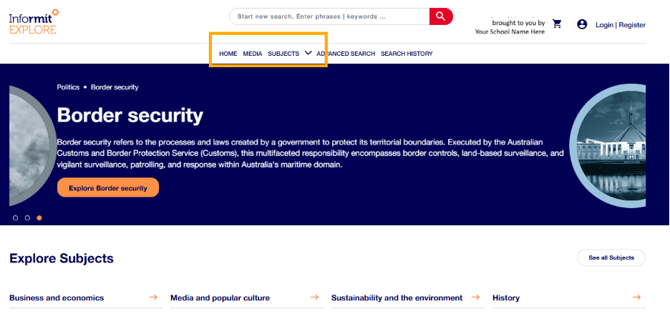
**Access to Explore Media** – Use the Media tab on your Explore dashboard to move between Explore and Explore Media. Click the Explore logo or the Home button to return to the main Explore page at any time.
**Explore Media’s special features**
**Classification settings** are set by your school during your on-boarding process to ensure that students see only suitable material. School staff can set up an individual log in to access all content.
**Interactive screen guides** provide overviews, activities, questions, and quizzes that can be used in the classroom and as homework tasks. The screen guides have been developed in conjunction with education and media specialists from Australian Teachers of Media (ATOM) and the Australian Centre for Educational Research (ACER). Many of the study guides link to text-based reviews, articles, and commentary to enable further investigation and place a movie or television episode into the wider historical and social context.
**Share video links and citations and create clips**
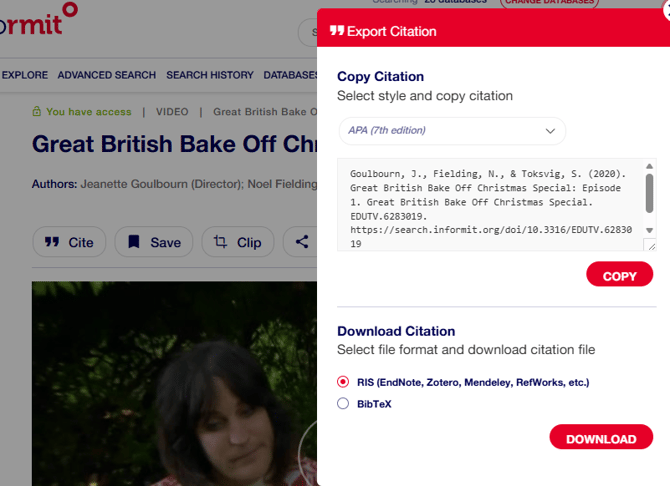
Each video page includes tools for saving links, creating clips, and saving citations.

**Video links** can be copied and shared or embedded into learning materials by both students and staff via a Standard Link, if the material falls within your school’s classification limitations. Staff can create an individual account to view and create Access Links for material that falls outside your school’s settings.
**Video Clips** can be created, saved, and shared by school staff using the **clip** button. Clips can be shared with students or other staff via Access Links and can be embedded into teaching materials or your school’s Learning Management System. Only staff with individual accounts can create, save, and share video clips.
**Citations -** Students and staff can view, copy and paste citations into assignments or teaching materials. Citations can also be downloaded into citation software.
**Still need help? Please reach out to [support.informit@rmit.edu.au](mailto:support.informit@rmit.edu.au)**
- [Informit](https://support.informit.org/knowledge-base/informit?hsLang=en#main-content)
- [Authentication](https://support.informit.org/knowledge-base/informit?hsLang=en#authentication)
- [Content Updates and Announcements](https://support.informit.org/knowledge-base/informit?hsLang=en#content-updates-and-announcements)
- [Platform Search Strategies](https://support.informit.org/knowledge-base/informit?hsLang=en#platform-search-strategies)
- [Core Training and Education resources](https://support.informit.org/knowledge-base/informit?hsLang=en#core-training-and-education-resources)
- [Core Administrator tools](https://support.informit.org/knowledge-base/informit?hsLang=en#core-administrator-tools)
- [Informit Explore](https://support.informit.org/knowledge-base/informit-explore?hsLang=en#main-content)
- [Explore Authentication](https://support.informit.org/knowledge-base/informit-explore?hsLang=en#explore-authentication)
- [Explore Content Updates and Announcements](https://support.informit.org/knowledge-base/informit-explore?hsLang=en#explore-content-updates-and-announcements)
- [Explore Search and Navigation](https://support.informit.org/knowledge-base/informit-explore?hsLang=en#explore-search-and-navigation)
- [Explore Training and Education resources](https://support.informit.org/knowledge-base/informit-explore?hsLang=en#explore-training-and-education-resources)
- [Explore Administrator tools](https://support.informit.org/knowledge-base/informit-explore?hsLang=en#explore-administrator-tools)
- [Publishing & Partners](https://support.informit.org/knowledge-base/publishing-partners?hsLang=en#main-content)
- [Partner Dashboard](https://support.informit.org/knowledge-base/publishing-partners?hsLang=en#partner-dashboard)
- [Publisher Resources](https://support.informit.org/knowledge-base/publishing-partners?hsLang=en#publisher-resources)
[](https://search.informit.org/)
[Start your search with Informit.org](https://search.informit.org/)
[About Informit](https://about.informit.org/)
Copyright © 2025, Informit
Melbourne, Australia